
Introduction
Ansible is an open-source automation tool that simplifies configuration management, application deployment, and task automation. It is designed to be simple, lightweight, and easy to use, making it a popular choice for IT professionals and DevOps teams.
Ansible uses a declarative language to describe the desired state of a system, and it automates the process of bringing systems to that state.
Key features of Ansible include:
- Agentless: Ansible doesn’t require any agent to be installed on managed nodes. It uses SSH (Secure Shell) for communication, making it easy to set up and manage.
- Declarative Language: Ansible uses YAML (YAML Ain’t Markup Language) for its playbooks, which are files where you define tasks and the desired state of the system. YAML is human-readable and easy to understand.
- Idempotent: Ansible is designed to be idempotent, meaning that the result of applying a configuration is the same regardless of how many times it is applied. This ensures consistency in system states.
- Extensible: Ansible is extensible and supports the creation of custom modules, allowing users to automate a wide range of tasks and integrate with various systems and services.
- Versatile: Ansible can be used for a variety of automation tasks, including server provisioning, configuration management, application deployment, continuous delivery, and more.
- Community and Ecosystem: Ansible has a large and active community, and there is a rich ecosystem of modules and roles contributed by the community. This makes it easy to find and reuse automation solutions.
How to Install Ansible Ubuntu 20.04
Via APT GET
To install Ansible on Ubuntu, you can use the package manager apt. Here are the steps:
- Update the package list to make sure you have the latest information about available packages:
sudo apt update- Install Ansible:
sudo apt install ansible- After the installation is complete, you can check the version of Ansible to verify that it was installed successfully:
ansible --version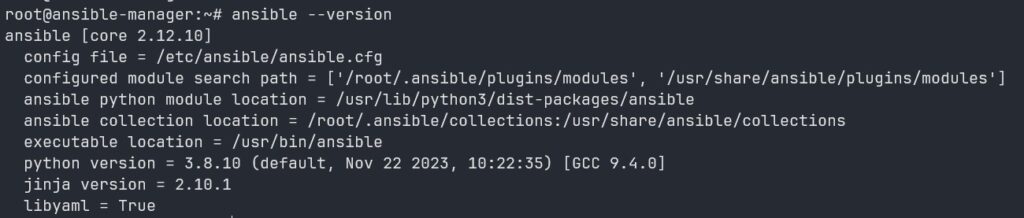
This should display information about the installed version of Ansible.
Via Repository
Installing Ansible via the official Ansible repository can provide you with the latest version of Ansible. Here’s how you can do it:
- Add the Ansible repository:
sudo apt update
sudo apt install software-properties-common
sudo apt-add-repository --yes --update ppa:ansible/ansible- Install Ansible:
sudo apt install ansible- Verify the installation:
ansible --versionThis will display information about the installed version of Ansible.
Using the official Ansible PPA ensures that you have access to the latest stable release. Remember to replace sudo with the appropriate command if you don’t have sudo privileges.
That’s it! You’ve now installed Ansible via the official repository on your Ubuntu system.

